
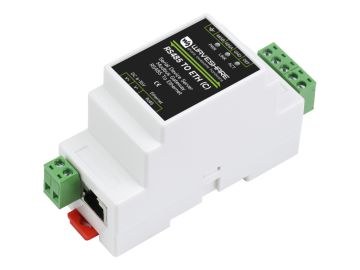
The Waveshare RS485 TO ETH (C) connects an isolated RS485 bus segment to an RJ45 Ethernet port, enabling bidirectional transparent transmission of serial protocols over TCP/IP. The device is designed for industrial environments and can be mounted on a DIN rail. This overview summarizes the key technical data, typical applications, and important verification steps.
Key Technical Data
The device is powered via a screw terminal at 6–36 V DC; signal and power isolation are present. The serial channel supports baud rates from 300 to 115200 bps, 5–9 data bits, and parity options none/even/odd/mark/space; flow control is not offered. The Ethernet port is a self-adaptive 10/100M RJ45 connector with 2 kV surge protection.
- Dimensions: 87 × 36 × 59 mm; DIN-rail mounting supported.
- Power: 6–36 V DC via screw terminal.
- Serial: 300–115200 bps, 5–9 data bits, selectable parity, no flow control.
- Ethernet: 10/100M RJ45 with 2 kV surge protection.
Operating Modes and Gateway Functions
In TCP server mode, the device accepts up to 30 simultaneous connections. In TCP client mode, up to 7 destination IP addresses can be configured; this mode can run alongside TCP server. UDP and UDP multicast operation are also available. As a Modbus gateway, the device converts Modbus RTU to Modbus TCP and offers storage and non-storage modes for automatic data collection and storage. For cloud integration, an MQTT gateway and HTTP POST/GET data delivery are supported; NTP time synchronization enables timestamped protocol content.
- TCP server: up to 30 connections.
- TCP client: up to 7 destination IPs, coexists with TCP server.
- UDP and UDP multicast available.
- Modbus gateway: RTU to TCP, storage/non-storage modes.
- MQTT gateway and HTTP POST/GET to cloud systems.
- NTP synchronization for timestamped content.
Configuration and Integration
Basic settings can be made via a web browser or the VirCom software. DHCP allows dynamic IP assignment, and DNS resolution supports domain addresses. Before commissioning, the selected operating mode, serial parameters, and network parameters should be verified on the physical device.
- Web configuration via browser or VirCom software.
- DHCP for dynamic IP assignment.
- DNS resolution of domain addresses.
- Before commissioning: verify operating mode, serial parameters, and network settings.
Typical Application Scenarios
The device is suitable as an IoT gateway for RS485 sensors, electricity metering and energy monitoring, remote PLC maintenance, and networking access-control systems. Because the exact hardware wiring differences between versions B and C remain open in the wiki, the appropriate variant should be confirmed against the physical device.
- IoT gateway for RS485 sensors.
- Electricity metering and energy monitoring.
- Remote PLC maintenance.
- Networking access-control systems.
Checks before choosing
- Select the desired operating mode: TCP server, TCP client, UDP, or Modbus/MQTT gateway.
- Match serial parameters (baud rate, data bits, parity) with the connected device.
- Ensure 6–36 V DC supply via the screw terminal.
- Check DIN-rail mounting space against the 87 × 36 × 59 mm dimensions.
- For version C: confirm hardware wiring differences versus version B on the physical device.
- Configure network parameters (IP, DHCP, DNS) and gateway targets (up to 7 TCP client IPs).
Verify before use
- No flow control is available – at high data rates this may affect the effective throughput limit.
- The source contains placeholders and open points regarding differences between versions B and C; exact product designations and wiring must be manually verified.
- Specific CLI or API commands are missing from the source; these must be supplemented from official documentation.
- Similar catalogue variants are not automatically identical; each variant should be checked individually.
Industrial serial server, RS485 to RJ45 Ethernet, TCP/IP to serial, rail-mount support, with POE function(optional)
Product number: WSAL20978
Technical basis: published JW Tech Wiki page. Always verify product details, price and availability on the current product page.